Quick Start
Prerequisites
Node.js (LTS). Everything else aiflow can install for you.
On Windows there are four steps to do first — BIOS virtualisation (VT-x/SVM), wsl --install,
a distro (Ubuntu) on WSL2, and build-essential inside WSL rather than MinGW. See
Installation → Windows prerequisites.
Install
git clone https://github.com/Cyber93de/aiflow.git
cd aiflow
Windows (PowerShell):
./install.ps1 # creates the aiflow shim + adds bin to the user PATH
Linux / macOS (bash):
bash install.sh # symlinks 'aiflow' onto your PATH
Per-OS details and demo GIFs: Installation. On every OS the installer asks once
whether to also install git, Subversion (svn), and Ollama — so a later aiflow init
only has to ask which Ollama models you want.
aiflow doctor               # what's present / missing (+ per-project summary)
aiflow install-deps --all   # install the rest of the toolchain (optional)
Packaged builds: github.com/Cyber93de/aiflow/releases.
Build a first project
mkdir my-app && cd my-app
aiflow init                 # interactive Q&A → writes .aiflow/config.json → renders everything
aiflow init --no-token-saving   # same, but with caveman + rtk off (full, unfiltered output)
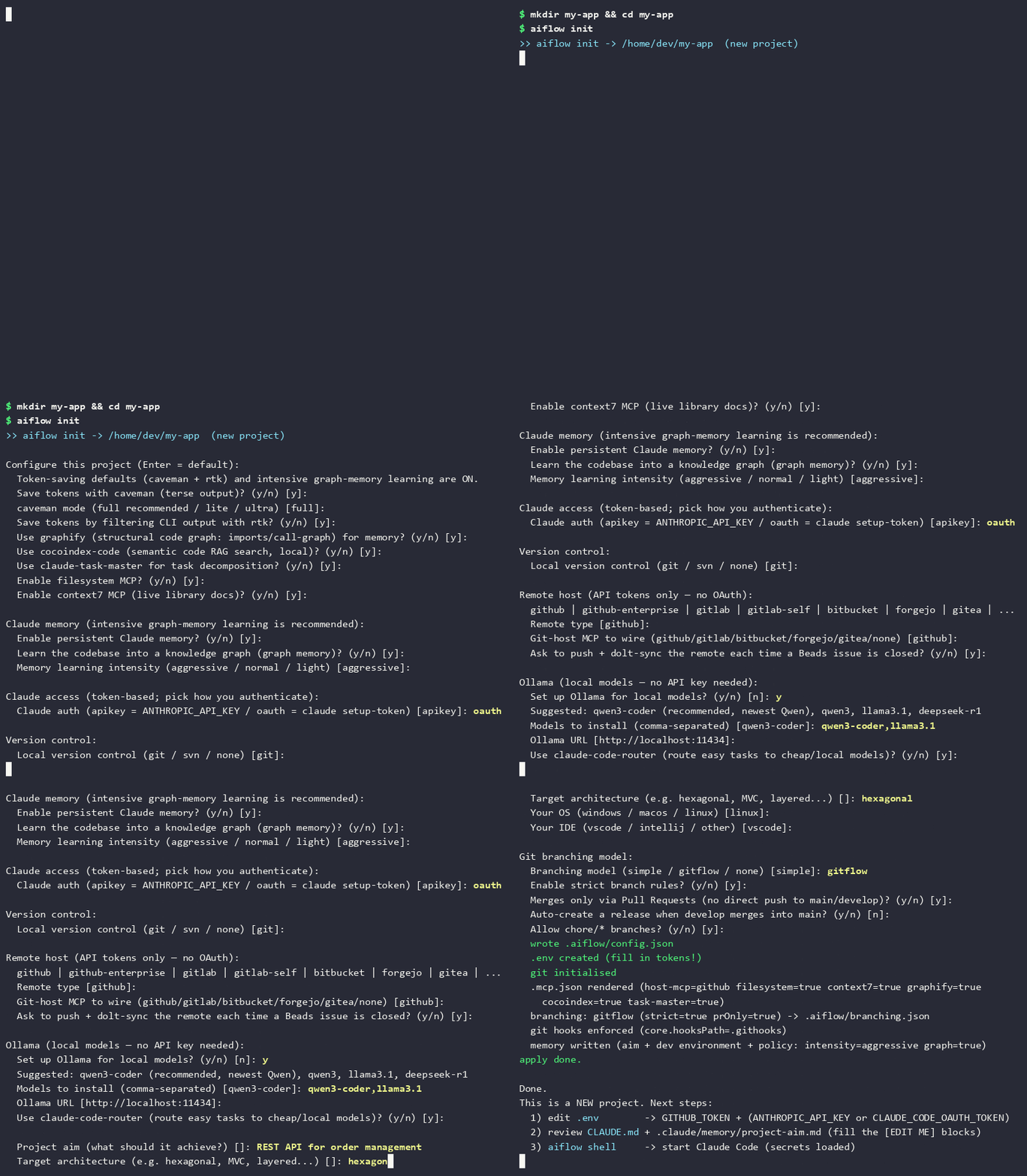
aiflow init asks (Enter = the sensible default; token-saving + intensive graph memory are on):
- caveman / rtk — token-saving output + CLI filtering.
- graphify (structural graph) and cocoindex-code (semantic RAG).
- task-master, filesystem MCP, context7 MCP.
- Memory — persistent memory, graph learning, and intensity (default
aggressive). - Coding agent(s) — Claude Code (default on, full feature set), GitHub Copilot, OpenAI Codex CLI — pick any combination; see Multi-Agent Support.
- Claude access —
apikey(ANTHROPIC_API_KEY) oroauth(claude setup-token). - Version control —
git/svn/none. - Remote host —
github | github-enterprise | gitlab | gitlab-self | bitbucket | forgejo |
gitea | custom | none
, plus which host MCP to wire (and optionally GitKraken’s MCP alongside it). Token-based. - Sync rule — ask to push + Dolt-sync on each issue close; auto-pull at session start.
- Ollama — set it up? which models? (
qwen3-coderrecommended). - Shared team preferences — code style, etc.
- Project aim / architecture / OS / IDE, and the git branching model (if VCS = git).
Don’t skip the project aim — it’s the cheapest quality lever. The aim tunes the agent to your project: every agent reads it before planning or coding. Tell it to aiflow during
init(question 12) or later viaaiflow change-settings— or write it manually into.claude/memory/project-aim.mdandAGENTS.md §1. A good aim is 2–4 plain sentences: what the product does, for whom, the target architecture, and the quality bar. Example: “Order-management REST API for our internal shops. Hexagonal architecture on PostgreSQL. Correctness and auditability beat raw speed; every endpoint ships fully tested.”
Then fill secrets and start:
# edit .env → your git-host token + (ANTHROPIC_API_KEY or CLAUDE_CODE_OAUTH_TOKEN)
aiflow shell                # loads .env, launches Claude Code with all MCPs wired
Inside the session:
/beads:ready                          # what's ready to work
bd create "Add health endpoint" -t task --claim   # create + claim a task
/implement                            # implementer builds it (code + tests, Google style)
/review-ac                            # reviewer gates it against acceptance criteria
Existing codebase (brownfield)?
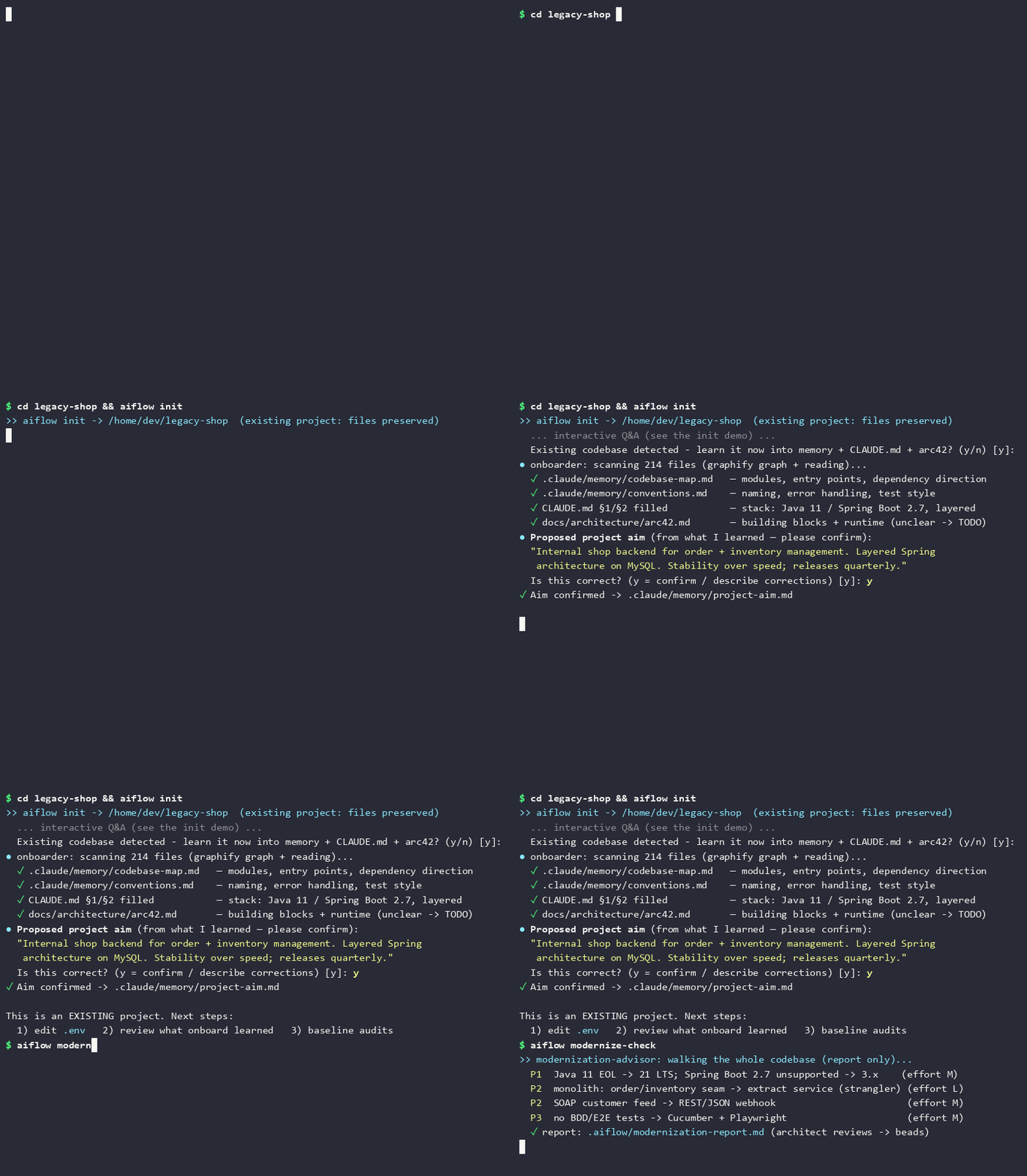
aiflow init detects it and offers aiflow onboard, which learns the code into .claude/memory/,
AGENTS.md, and arc42 docs so the agent starts informed — and proposes a project aim from the
understanding it built. The proposal is not silently adopted: the onboarder asks you to confirm
or correct it (headless runs mark it PROPOSED — please confirm in project-aim.md). Follow up
with aiflow modernize-check for a modernisation report the architect can turn into beads:
Build the code indexes any time with aiflow index (graph + RAG).
Staying up to date
aiflow update            # self-update the aiflow install itself (git pull)
aiflow project-update     # refresh THIS project's scripts from the installed templates
aiflow update pulls the latest aiflow release into your AIFLOW_HOME checkout. It only
touches the install — existing projects keep running on whatever templates they were
generated with until you explicitly bring them forward. Each project stamps the aiflow
version it was created with in .aiflow/config.json (meta.aiflowVersion); once that
falls behind the installed CLI, any aiflow command run inside the project asks
(interactively) whether to run aiflow project-update right then. It overwrites the mechanical,
never-hand-edited scripts (.aiflow/*, .claude/hooks/*, docker/run.*, .github/scripts/*),
refreshes the agent definitions (AGENTS.md/CLAUDE.md, .claude/agents|commands|skills) and the
git hooks (.githooks/*) keeping any file you customised as <file>.bak, and re-applies your config. Your .beads/,
.claude/memory/*, .github/workflows/* and your own settings are untouched, and nothing is ever
deleted — a script aiflow no longer ships is listed at the end of the run, not removed.
Next
- Features · Memory · Configuration · Commands